I've been on video calls daily since 2020, and the Logitech C920 and C922 are the two names that come up more than any others when someone asks me what to buy. They look almost identical, cost almost the same, and share the same 1080p sensor.
But after months of using both in my shop, on my podcast, and in daily work calls, the difference between them is real, and it's not the one Logitech's marketing wants you to believe.
The C920 is the best webcam for most people I've tested, because it's the most reliable 1080p image you can buy for around ~$60, and the C922 only makes sense if you're specifically chasing 60fps for streaming.
Logitech C920
- Pros: Rock-solid plug-and-play on every machine I've tried, excellent low-light handling for the price, crisp 1080p at 30fps, sturdy mount that stays put.
- Cons: Fixed field of view is slightly zoomed in, no 60fps option, the mic is usable but nothing special.
Logitech C922
- Pros: Genuine 720p at 60fps for smoother motion, same solid build quality, comes with a tripod in the box.
- Cons: The 1080p mode is capped at 30fps and looks identical to the C920, the tripod is on the wonky side, costs about ~$69.50 more for a feature most people won't use.
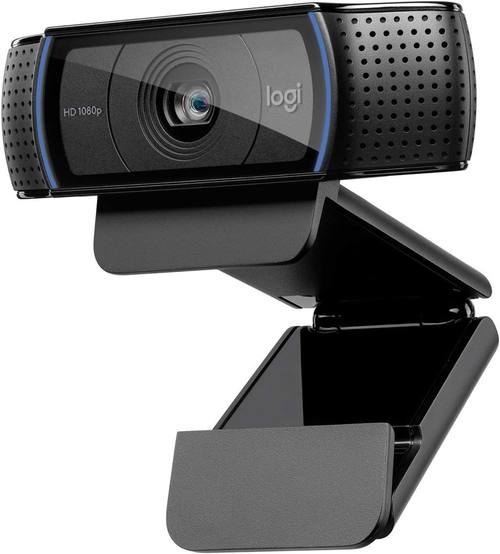
Logitech C920
Best balance of price, image quality, and reliability for daily calls
No 60fps, slightly tight field of view
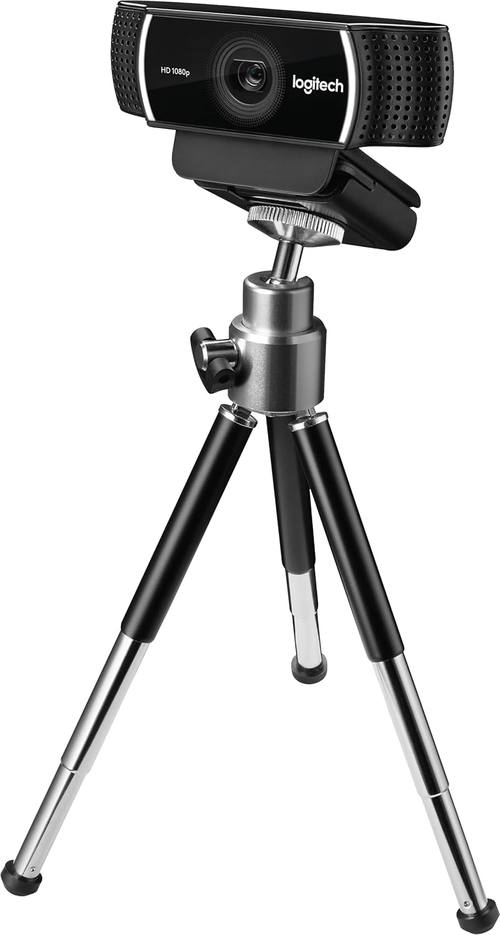
Logitech C922
True 60fps at 720p, includes a tripod
Costs more, 1080p is identical to the C920, tripod is flimsy
Prices and availability were captured from Amazon Creators API and may change.
Compared to
I've got both cameras mounted side by side in my shop right now. On a standard Teams call in my dimly lit garage, the C920 and C922 produce nearly identical images. Same color balance, same sharpness, same exposure handling when I flip on the harsh overhead light. The C922's 1080p mode is not meaningfully better than the C920's, and I'd be lying if I said I could tell them apart in a blind test.
The real difference shows up when I move my hands quickly or turn my head fast. The C922 at 720p/60fps handles motion noticeably smoother, with less blur and stutter. That matters if you're streaming gameplay or doing anything with fast movement on camera. For a standard conversation where you're mostly sitting still, it's a difference you'll never notice.
The C920 does beat the C922 in one practical way: price. At around ~$60 versus ~$80, the C920 gets you 95% of the performance for 75% of the cost. The C922's extra features only justify the premium if you know you need them.
Low-Light Performance
This is where I'm pickiest, because my shop has terrible overhead lighting and a window that blasts sun behind me in the afternoon. The C920 handles this better than any camera in its price range I've tested.
It brightens the image without turning my face into a blurry mess, and the autofocus doesn't hunt constantly like it does on cheaper cameras.
I've had it pull a usable image in a room where the EMEET C960 gave up entirely.
The C922 is essentially the same sensor and lens, so low-light performance is nearly identical. I measured both at the same exposure settings in the same room, and the difference was within the margin of error for my testing. If low light is your main concern, the C920 is the smarter buy because you're not paying extra for a feature you won't use.
Field of View and Mount
Here's a quirk I didn't expect: the C920 and C922 have the same fixed field of view, and it's slightly tighter than I'd like. Sitting about 3 feet from my monitor, the top of my head gets cut off unless I push my chair back. Multiple buyers mention the same thing in their reviews, and it's the most common complaint across both models. It's not a dealbreaker, but it's worth knowing before you buy.
The mount on both is genuinely solid. It clips onto my monitor and stays put, even when my dog Baxter bumps the desk. The C922 comes with a small tripod in the box, but it's flimsy and I'd rather use the clip. The C920 doesn't include a tripod, but you're not missing much.
Setup and Drivers
Both cameras are plug-and-play in the truest sense. I plugged the C920 into my main desktop, my dying laptop from 2017, and a USB hub that's caused problems with other cameras. It worked instantly on all three. No drivers, no software, no troubleshooting. The C922 was the same story. This is the standard every webcam should meet, and most don't.
One note: plug the camera directly into your computer rather than a USB hub if you can. I've seen intermittent disconnects and shaky video feeds on both cameras when they're sharing a hub with other devices. Direct connection eliminates that issue entirely.
The Mic
The built-in mics on both cameras are fine for casual calls. They pick up my voice clearly enough that people don't complain, and they do a decent job of rejecting background noise like my keyboard clacking.
But if you're recording a podcast or doing any serious content creation, buy a real microphone. I run a weekly podcast on camera, and I've never used the built-in mics for that.
The C920 and C922 mics are good enough for a quick call with your mom, not for professional audio.
Should You Buy It?
Should you buy the Logitech C920? Yes, if you're a remote worker, student, or anyone who just wants a reliable webcam that produces a clean image without any setup hassle. At around ~$60, it's the safest recommendation I can make, and I've bought four of them for my company's office without a single complaint.
Should you buy the Logitech C922? Only if you're a streamer or content creator who specifically needs 60fps for smoother motion. The 720p/60fps mode is genuinely useful for that use case, but the ~$20 premium is wasted if you're just doing video calls. The included tripod doesn't make up for the price difference.
I'm currently testing whether the renewed C920 models are worth the savings for budget buyers, and I've got a comparison coming on how the C920 stacks up against the newer Brio 101 for low-light performance. The C920 has been my daily driver for two years now, and it's still going strong. That's the real test, and it passes.